
Org Charts
See the structure, not just the data. SingleFile Org Charts pulls live ownership data directly from the SingleFile platform and instantly renders it as an interactive, explorable diagram. There's no manual data entry and no need to rebuild something that already exists elsewhere. With a few simple clicks, you get an immediate, accurate snapshot of your entire organization.
BETA Live data. Dynamic diagrams. Updated on your terms.
Instant generation from your data
Your org chart builds from your live SingleFile data in just a few clicks, eliminating hours of manual drawing. When your records change, pull those updates into the chart on demand with Update Chart, so it stays accurate without ever drifting on its own.
- Generates instantly with a few simple clicks
- Eliminates manual drawing
- Update on demand with your latest SingleFile data
Safe AI-powered customization
Customize the look and structure of your chart with simple, natural-language commands. Edits stay on the visual layer, and when you make a change worth keeping, you decide whether to push it back to your underlying records.
- Use natural language commands
- Execute sweeping bulk edits in seconds
- You control what syncs back to your data
Scenario modeling & milestone Snapshots
Save as New View to clone a chart into its own workspace, so you can model and experiment with future scenarios without touching the original. Lock a definitive milestone as a Snapshot to preserve it permanently.
- Preserve historical Snapshots
- Model restructuring scenarios locally
- Protect core data
Targeted focus & secure sharing
Visually isolate specific branches of your organization and export these tailored views as presentation-ready PDFs with custom redactions and password protection.
- Use "Focus" mode
- Export professional PDFs
- Apply reliable security
From entity data to presentation-ready in seconds
No manual diagramming. No rebuilding from scratch. Four steps from raw entity data to a board-ready PDF.
Your chart generates in seconds
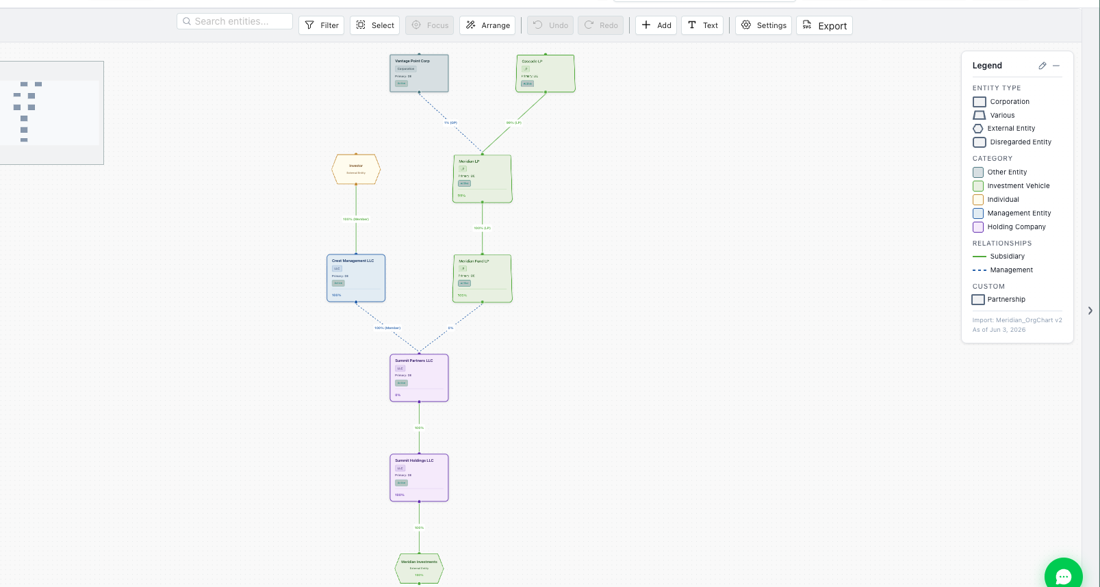
Org Charts reads your live SingleFile entity and ownership data. Click generate and your entire organizational structure renders as an interactive, explorable diagram in just a few clicks.
- Ownership percentages, entity types, and jurisdictions populated from your SingleFile data (where available)
- Multi-entity and cross-jurisdiction structures fully supported
- Drag to navigate, zoom, and explore large hierarchies
Customize with plain-language commands
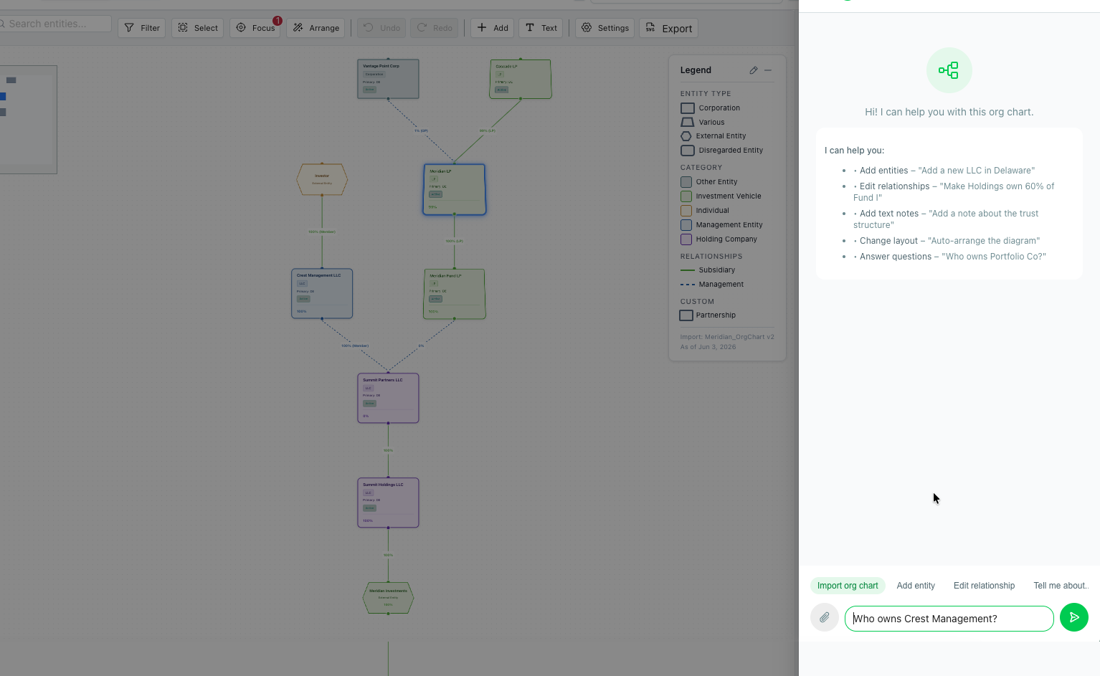
Tell the AI what you want in plain language and it executes the edit instantly, restyling, renaming, or restructuring the visual, while your actual legal records stay completely untouched.
- "Color all Delaware entities teal"
- "Update ownership percentage for Acme Holdings to 75%"
- "Remove the Cayman subsidiaries from this view"
Model scenarios, lock Snapshots
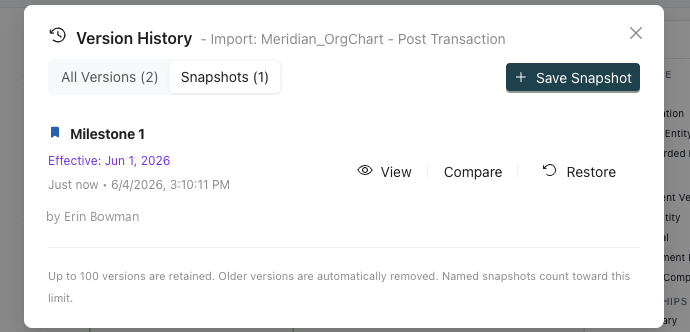
Create named "Views" to model and experiment with future scenarios, like a post-transaction structure, without duplicating entities or modifying your system of record. Lock a definitive milestone as a "Snapshot" to preserve it as a point-in-time record.
- Views let you experiment freely; edits stay contained
- Snapshots preserve milestones for M&A, audits, and board presentations
- Core data stays protected throughout
Share securely, present confidently
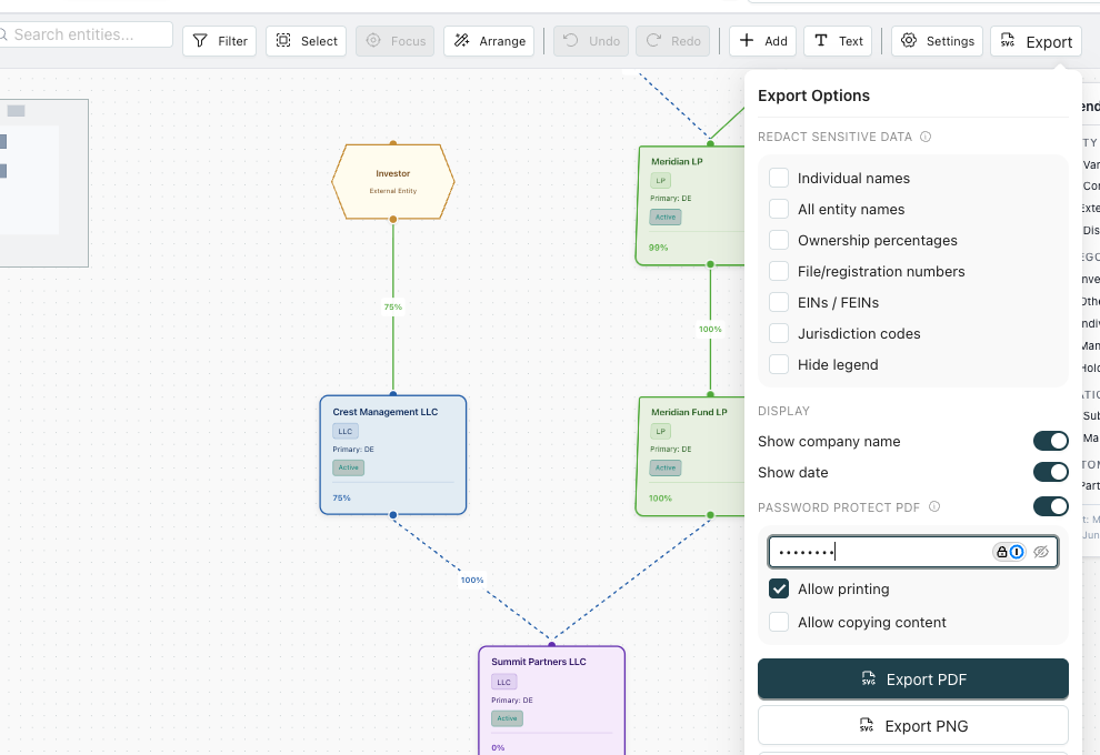
Export presentation-ready PDFs in seconds. Apply redactions to sensitive fields before sharing externally, and add password protection for investors, lenders, or outside counsel.
- Clean PDF output, with no more rebuilding in PowerPoint
- Custom redaction controls before export
- Password-protected files for secure external distribution
Already have an org chart? Upload it.
Our Import feature lets you bring your existing charts into SingleFile. Upload any org chart or ownership diagram and we'll extract the entity and ownership data, ask you to verify accuracy, and import it directly into your account. Your existing work doesn't go to waste; it becomes the starting point.
- 1Upload your existing org chart, PDF, or ownership diagram
- 2AI extracts entity names, ownership percentages, and relationships
- 3Review and confirm extracted data for accuracy
- 4Data imports into SingleFile, chart ready instantly
Bring an existing org chart into SingleFile to visualize and edit it here.
How it works- 1 Upload your fileSelect an org chart file from your folders.
- 2 Edit it hereView and modify the chart directly inside SingleFile.
As a beta feature, behavior may change.
Frequently asked questions
Common questions from teams evaluating Org Charts for their entity portfolios.
Does my org chart update automatically when my entity data changes?
No, and that's intentional. Many org charts are point-in-time records you don't want shifting on their own. When your entity data changes in SingleFile, you pull those updates into a chart yourself with Update Chart and select exactly which changes to apply, so you stay in control of when and what gets reflected.
Will AI edits affect my underlying legal records?
AI-powered edits in Org Charts affect the visual presentation layer first, so you can experiment freely without compliance risk. If you make a structural change you want to keep, SingleFile can ask whether to push it back to your underlying entity data, so you decide what updates your system of record.
What's the difference between Versions, Snapshots, and Views?
Versions are your save history: SingleFile keeps your recent saves (both auto and manual) so you can see what changed, who changed it, and restore an earlier state. A Snapshot locks a chart as a definitive, point-in-time milestone, set in stone and preserved permanently, even after it ages out of your version history. A View is a separate workspace: choose Save as New View to clone the chart so you can model changes and experiment without affecting the original.
Can I share charts with people outside of SingleFile?
Yes. You can export any View in presentation-ready PDF, SVG, PNG, or JPG formats. Before exporting, you can apply custom redactions to hide sensitive fields, and add password protection (available on PDF exports) for secure distribution to investors, banks, or outside counsel.
Is Org Charts available to all SingleFile customers?
Org Charts is currently in Beta. Early access is available now, reach out to your SingleFile representative to schedule a personalized demo using your own entity structures.
What if I already have an org chart from another tool?
You can bring it in using our Import feature. Our AI extracts the entity and ownership data, asks you to verify accuracy, and imports it directly into SingleFile, so your existing work becomes the starting point, not something you have to recreate.
Join the Beta
Interested in exclusive early access to one of the most requested features we've ever built? SingleFile's Org Charts is now in Beta. Fill out the Beta Request Form to get early access today and share direct input into how the feature evolves.